
 Built for Shopify
 Bring your Instagram feed to your Shopify storefront with ease
Showcase Instagram content, shoppable videos, UGC, and social proof in an on-brand feed.

Trusted by world-class Shopify brands









Stores use our app
App store reviews
Average rating
Powerful ecommerce widget for UGC, video, and social proof
Built for scale, made for every brand.
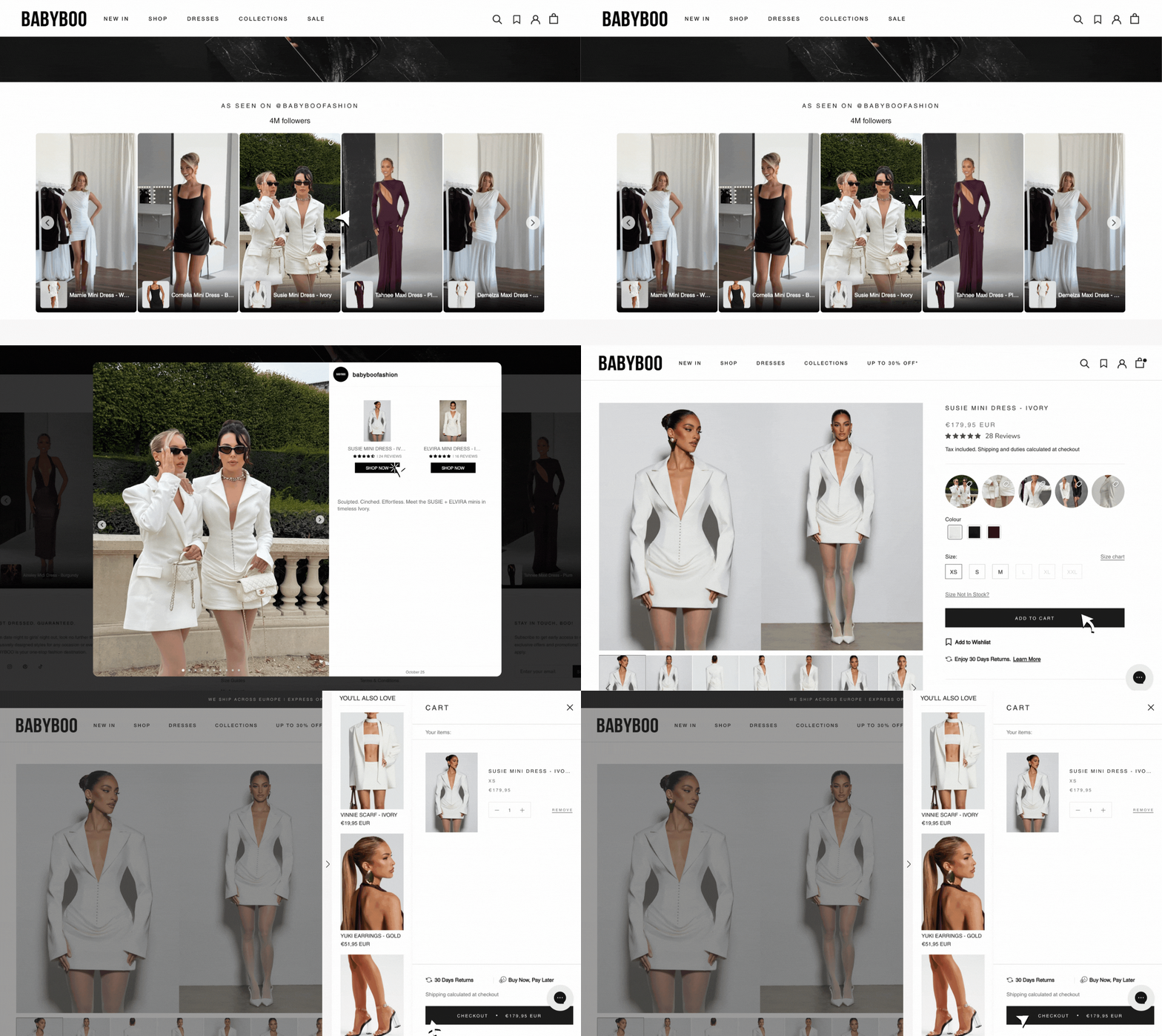
Embed Instagram widget to show Instagram and video feeds
Showcase your Instagram and video content beautifully on your Shopify store to build social proof and drive sales.

Display UGC and creator content effectively on your Shopify store
Social proof that drives action - showcase creator and Instagram content to build trust and increase conversions.

Built for performance. Designed for you.

No impact
on store speed

Expert support,
anytime

Easy to use:
no coding required!
Loved by Shopify merchants
"Easy setup, big impact. Highly recommend! It's boosted my social proof and made my products more relatable."
Athleisure Avenue
United States
"Absolutely stellar customer service - and the feed does not slow performance of your website! It's fantastic- and the developers are incredibly responsive and skilled. I'm very grateful to the Mintt team. Thank you!"
Cheeky Seats Scooter Seat Covers
United States
"Been using this app for nearly 5 years. Customer service fast, efficient and friendly! Thank you!"
Foundd Legal
Australia
"Clean, simple to use app. Team was quick to respond and adapt to my needs."
Nimblii
Germany
"Makes clients trust your store more."
ZAWADIBORA
United States
"Top notch support and a really slick looking app that adds to any website seamlessly."
The Sustainable Watch Company
United Kingdom
Questions
How do I add an Instagram feed to my Shopify store?
You can add an Instagram feed to your Shopify store by using an Instagram feed widget like Mintt Instafeed. Simply install the app from the Shopify App Store, connect your Instagram account, and configure your layout. The widget will automatically sync and display your posts on your website.
What is Mintt Instafeed and how does it work?
Mintt Instafeed is a powerful yet easy-to-use Shopify app that displays shoppable Instagram feeds on your storefront. It helps merchants increase engagement, build social proof with UGC (user-generated content), and drive conversions - all without slowing down your store.
How much does Mintt Instafeed cost?
Mintt Instafeed offers a free Instagram widget plan with no branding, ideal for all Shopify stores looking for a free Instagram plugin for website. The free plan includes core features like automatic syncing, responsive design, and customizable layouts. For merchants who want to unlock advanced features - such as product tagging, UGC from tagged posts, hashtag filtering, and file uploads - Mintt Instafeed offers flexible paid plans. Every paid plan comes with a 7-day free trial.
Will Mintt Instafeed slow down my Shopify store?
Not at all - Mintt Studio is fully optimized for performance. It's lightweight and has zero impact on your store's speed.
How do Instagram feeds improve social proof on my website?
Displaying an Instafeed or UGC on your storefront helps build social proof for eCommerce, by showing customers using your products in a real-life context. Mintt Instafeed supports Instagram tagged posts, hashtag filtering, product tagging/ shoppable feeds, and more, giving you full control over the content displayed and experience.
Can I see examples of Instagram feeds on Shopify stores?
You can see real examples of Shopify stores using embedded Instagram feeds by checking out stores that use the Mintt Instafeed widget at /shopify-instafeed-demo.
Does Mintt Instafeed offer Enterprise-grade security?
Yes. The Mintt Instafeed app is Built for Shopify, meeting Shopify's highest standards for security, performance, and reliability. It's also an official Meta-approved app and aligns with GDPR and industry best practices to protect your data. Please check our Privacy Policy at /privacy-policy for detailed information. Mintt is optimized for performance, won't slow down your store, and is suitable for high-traffic and Shopify Plus stores.
More Mintt apps to grow your Shopify store


Partners
Seamless integrations and powerful solutions for your store.


Get started today for free
Join 300,000+ Shopify stores using Mintt Instafeed to build social proof